|
CyberLink PowerDVD 10
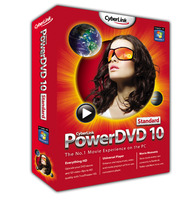 CyberLink PowerDVD is a 3D Video, HD, Blu-ray and DVD playback software helps you watch Blu-ray Disc and DVD movies on your PC/HDTV and offers the best HD, Blu-ray and DVD software playback around.
Use TrueTheater to up DVD quality for viewing on an HD display. Navigate easily using your DVD playback software with
Fancy View, flipping through your movie titles and previewing content. There are plenty of other useful interactive
features for die-hard movie fans and the casual viewer alike. Compatible with Windows 7, PowerDVD 9 DVD player software is truly the way HD and Blu-ray software were meant to be enjoyed!
PowerDVD 10, the consumer's favorite 3D, HD, Blu-ray & DVD player software,
has now been optimized for 2nd Generation Intel Core processors that ensure silky
smooth playback. Complemented by high-definition Dolby and DTS technologies,
PowerDVD 10 now plays an extensive range of video formats including MKV, FLV, 3GP,
converts 2D into 3D, and makes movies more social by sharing bookmark reviews
and live comments with MovieMarks. Experience PowerDVD 10—the best HD,
Blu-ray player available today. Download our free Blu-ray player software
today for a 30 day trial.
| Software Information |
System Requirements |
| Version: | 10.0.1909 |
- Windows 8/7/XP/Vista/2003/2008
- 512M MB RAM
- 20MB Free Hard Disk Space
|
| File Size: | 122 MB |
| License: | Free to try, $49.95 to buy |
| Screenshot: | View Screenshot
|
| Rating : |  |
Main Features of CyberLink PowerDVD 10:
High-Definition Video Playback

- Breathtaking Clarity - New and improved video technologies
- Sharp, Bright Colors - Support for high definition video formats
- Best Surround Sound Technology - Complete movie theater quality surround sound support
Freetyle UI - Choice is freedom
- Choice is freedom - Choose from 5 UI modes and multiple skins
- Dock mode - Access controls fom the bottom of the viewing screen
- Wheel Control mode - Save space by providing only essential player controls
- Mini mode - Get access to controls via the taskbar
- Player mode - Move your floating panel of complete controls; select from a choice of colors
- Fullscreen mode - Expand the viewing mode to fit the entire screen
Smart Utilities - For enhanced DVD viewing

- Say-It-Again - Never miss a word
- Read-It-Clearly - Move subtitles from your movie screen
- Notebook Maximizers - Extend your notebook viewing time
UPnP Connectivity - Cut yourself loose

- UPnP Connectivity - Play videos from any UPnP enabled device in your home network
- Media Server - Connect to your Digital Home Media Server
Video Technologies
- IMPROVED CyberLink Eagle Vision (CLEV)-2 brightens images and
naturalizes colors. Allows users to manually adjust the level of enhancement
- Smart Video Deinterlacing ensures a smoother and clearer video image.
Provides a choice of automatic or user defined interlacing methods
- CyberLink Pano Vision (CLPV ) stretches 16:9 and 4:3 video to fit the monitor size
Audio Technologies
- CyberLink Multi-Environment Impression-2
(2-5->8-channel expansion technology), including Movie mode and two music modes: Standard and Onstage
- CyberLink Headphone (headphone surround sound)
- CyberLink Virtual Speaker (2-channel surround sound), including
Living Room, Theater, and Stadium mode
- Low Frequency Effects (LFE) mixes the LFE channel with front speaker channels
- Dynamic Range Compression offers modes suited to Quiet,
Noisy and Normal listening environments
Controls for DVD Enthusiasts
- A-B Repeat loops a scene set by users
- PowerDVD express menu provides quick disc controls via right-clicking the mouse
- 9X Digital Zoom for enlarging specified areas on screen
- Dual Captions/Subtitles Display supports the viewing of two subtitle languages
- Dual display mode enables movie playback on two screens
- Color Profiles adjust movie colors while playing videos
using a choice of user-defined or preset Original, Vivid, Bright or Theater profiles
- Toolbar Controls Setup allows users to customize the tasks
toolbar for playing discs
- Select DVD Menu lets users navigate a DVD via the disc structure
- Video Bookmarks enable quick access to a user's favorite movie scenes
- Resume playback allows users to play a DVD from the last scene prior to stopping
- Screen snapshots can be captured with a user-defined aspect
ratio and saved as a bmp, jpg, gif or png file, as wallpaper or to the clipboard
- External subtitle support allows playback via AVI, DivX and WMV files (supports SRT, SUB, SSA, ASS, PSB, and SMI extensions)
- On-screen display (OSD) lets users define where video information is located
- Changeable skins let users change the look of their control panel
- Closed captioning support provides closed captioning for the hearing impaired
Features for Audio Enthusiasts
- Audio visualizations provide onscreen image effects while playing music
- Karaoke mode dampens music tracks to allow users to sing along with their Karaoke discs
- Audio pitch scaling is a fun feature letting users adjust the pitch of video or audio files
- Audio equalizer presets add atmospheric effects with presets like techno, blues
RELATED SOFTWARE DOWNLOADS FOR CYBERLINK POWERDVD
- Cucusoft YouTube Mate
is the most powerful YouTube assistant on the planet that helps you download, convert, play and manage your favorite YouTube videos...
- BlazeVideo HDTV Player
is a full-featured and easy-to-use HDTV Player software
- Splash
Splash is a Next Generation of media player for PC and AVCHD player's Upgrade.
- FMV Pro
unique movie editor and player bursting with multimedia features
- HDX4 Player - Play MPEG4 video files
The HDX4 Player consists of the powerful HDX4 decoder and a video player which can not only playback MPEG4 videos but also a great number of common audio and video files
- Free TV Player
watch directly over 800 free Internet TV channels from your PC. All Internet TV Stations are from 100+ countries. Free TV Player provides Music, News, Educational, Sports & Shopping channels
- Hero DVD Player
powerful DVD player software that offers advanced video and audio playing entertainment on the PC
- Juke
audio and video player for all your sound, music, and video files, and also including music CDs
- AMV Converter for Mac
AMV Converter for Mac converts mov/mp4/dv/m4v/flv/avi/mpg/wmv to AMV.
- ViVi DVD Player
ViVi DVD Player is DVD player to help you watch all region DVD disc.
- SoundTaxi Media Suite
SoundTaxi converts audio/video files to MP3/iPod and other MP3 player file formats.
- Sothink HD Movie Maker
Sothink HD Movie Maker convert and burn videos to Blu-ray Discs/DVD.
|
|





 BestShareware.net. All rights reserved.